I migrated 5 websites from Framer to free hosting: €1,500 saved
Real case studies: How I migrated 5 businesses from Framer to free hosting. €300-420/year saved per site, 50% faster load times, complete process revealed with metrics.
I migrated 5 websites from Framer to free hosting: here's what I learned (and €1,500 saved)
As the founder of a digital health startup where I built patient and clinician apps serving real users, I knew enough about web development to realize I was getting a bad deal: €25 per month for having my website on Framer. That's €300 per year. For a "simple" marketing website.
Don't get me wrong, Framer is an excellent tool. The visual editor is great, and I managed to make a professional-looking website when I didn't know a lot about web development. But once your site is built, you're essentially paying €300/year for... hosting. That's it. The design work is done. The content is there. You're just renting server space that you could get for free elsewhere.
So I did what any technically-minded founder would do: I migrated our site to Cloudflare Pages: zero monthly fees, same functionality.
The migration took me about a week because I was learning as I went (and working on many other stuff as a founder does...). But I manged to migrate everything: Blog, all my analytics tracking events, all my forms, redirects, etc. I learned a process I could replicate.
Then something interesting happened. I was chatting to a local cultural association I offered to migrate their website for free. It worked! They were so happy that one person on the board asked me to migrate their website too.
In the last six months, I've migrated five websites from paid platforms (mostly Framer, one from Squarespace) to free hosting on Cloudflare Pages as a side project. Every single one is still running smoothly. Every client is happy. And collectively, we've saved over €1,500 per year in recurring costs.
Here's what I learned from those migrations—the good, the challenging, and the lessons I've learned about when this makes sense and when it doesn't.
Case study 1: Local cultural association
The client A Barcelona-based cultural association promoting local cultural events. They had a 6-page Framer site: homepage, about, events calendar, gallery, blog/news, and contact.
Before migration
- Platform: Framer
- Monthly cost: €25/month (€300/year)
- Load time: 3.2 seconds average
- Lighthouse performance score: 67
- Main pain point: "€300/year is money we'd rather spend on actual events."
The migration process This was my second migration (after my own site), so I had a process down. Here's what it took:
Day 1 (4 hours): Content extraction and planning
- Downloaded all images from Framer
- Copied text content into organized Google Docs
- Mapped out the site structure
- Identified the event calendar as the trickiest feature
Day 2-3 (8 hours): Building in Next.js
- Set up Next.js project with Tailwind CSS
- Recreated the design (kept it very similar to their Framer site)
- Built reusable components for events
- Set up Tina CMS so they could manage events and blog posts themselves
Day 4 (3 hours): Testing and deployment
- Responsive testing across devices
- Set up Cloudflare Pages deployment
- Connected their domain
- Trained the client on using Tina CMS (15-minute Loom video)
Total time: 15 hours spread over 4 days
After migration
- Platform: Next.js on Cloudflare Pages
- Monthly cost: €0 (only €12/year for domain, which they had before)
- Load time: 0.9 seconds average
- Lighthouse performance score: 94
- Client feedback: "This is actually easier to update than Framer. We just go to /admin, edit the event details, and it's live."
Key challenge solved The events calendar was tricky. In Framer, they had a manual process of updating a visual layout. I set up a simple CMS collection in Tina where they just fill in:
- Event name
- Date
- Description
- Image
The page automatically formats and sorts events by date. They can add new events in under a minute now versus the 10-15 minutes it took in Framer.
Six months later They're still using the site. They've added 24 events and 8 blog posts. Zero issues. €150 saved so far, €300 saved by year-end.
Case study 2: Wedding photographer
The client A friend who shoots weddings across Spain. Her portfolio site had probably 200+ images across galleries. She was on Squarespace, paying €30/month.
Before migration
- Platform: Squarespace
- Monthly cost: €30/month (€360/year)
- Load time: 6.5 seconds (image-heavy site)
- Lighthouse performance score: 58
- Main pain point: "The site is so slow. Potential clients click away before they see my work. And €360/year feels expensive for a portfolio."
The migration process
Day 1 (5 hours): Image management nightmare This was the challenging part. She had over 200 high-resolution images, many of them 4-8MB files straight from her camera.
- Downloaded all images
- Used Squoosh to batch-compress them (brought average size from 5MB to 200KB with minimal quality loss)
- Organized into wedding collections
- Set up proper folder structure
Day 2-3 (10 hours): Building the portfolio
- Next.js with a focus on image optimization
- Used Next.js Image component for automatic lazy loading
- Created a beautiful masonry gallery layout with Tailwind
- Set up Tina CMS for her to add new wedding galleries herself
- Testimonials section with easy CMS editing
Day 4 (3 hours): Polish and deployment
- Responsive testing (crucial for a visual site)
- Performance optimization (getting those images to load fast)
- Cloudflare Pages deployment
- Domain connection
- Training session
Total time: 18 hours over 5 days
After migration
- Platform: Next.js on Cloudflare Pages
- Monthly cost: €0
- Load time: 1.1 seconds (despite being image-heavy!)
- Lighthouse performance score: 91
- Client feedback: "It is the first time I get a client through my website. Before I only got clients through wedding venue partnerships."
Key challenge solved Image optimization was key. Squarespace was serving those massive 5MB files. With Next.js Image component:
- Automatically converts to WebP format
- Serves appropriately sized images for different devices
- Lazy loads images as you scroll
- Result: Gallery pages load in 1.1 seconds vs 6.5 seconds
The speed improvement alone probably leads to more bookings. Wedding photography is competitive—if your portfolio loads slowly, potential clients bounce.
Six months later I haven't heard any complaints, so I'm guessing it is working good!
Case study 3: My own business (Lumina Salud)
The context I should probably mention this migration first since it's what started everything. Lumina Salud is a digital health company I founded that treats obesity through GLP-1 medications combined with behavioral coaching.
Our marketing website was on Framer. 13 pages including a blog where I share insights about digital health, obesity treatment, and building healthcare products.
Before migration
- Platform: Framer
- Monthly cost: €25/month (€300/year)
- Load time: 2.8 seconds
- Lighthouse performance score: 71
- Main pain point: As a founder building a startup, €300/year bothered me. Also, I had used a lot of Framer's code override features for custom functionality (interactive calculators, custom forms), and I knew those wouldn't export cleanly if I ever wanted to leave.
The migration process
Week 1 (15 hours): Learning and building This was my first migration, so it took longer. I essentially taught myself the modern stack while building:
- Set up Next.js with TypeScript (I already knew React from building our apps)
- Learned Tailwind CSS (absolutely love it now)
- Researched CMS options—chose Tina CMS for its simplicity
- Recreated our design component by component
Week 2 (8 hours): Complex features The custom features I'd built with Framer code overrides needed to be rebuilt properly:
- BMI calculator (interactive)
- Treatment cost calculator
- Newsletter signup integration with our email system
- Contact forms that route to our CRM
- Blog with proper SEO (critical for our content marketing)
Week 3 (5 hours): Migration and testing
- Deployed to Cloudflare Pages
- Configured DNS
- Tested everything thoroughly
- Set up analytics (we're very data-driven at Lumina)
Total time: 28 hours over 3 weeks (but I was learning as I went)
After migration
- Platform: Next.js on Cloudflare Pages
- Monthly cost: €0
- Load time: 1.3 seconds
- Lighthouse performance score: 96
- Result: Saved €300/year. More importantly, I own every line of code. Can iterate quickly. Site is faster, which helps our SEO.
Here you can see the improvement in SEO:
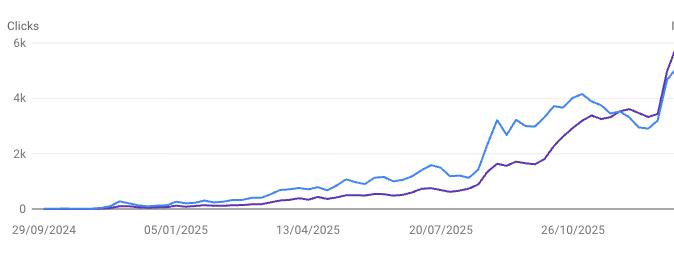
Key challenge solved Those custom code overrides in Framer were actually limiting. Rebuilding them properly in React gave me more control. For example, our treatment cost calculator now:
- Saves user inputs in local storage
- Provides a shareable results link
- Tracks calculator usage in analytics
- Integrates with our booking flow
Framer's code overrides couldn't do all that. Now I can iterate on these features whenever we want.
Six months later We publish 2-3 blog posts per month using Tina CMS. I can write in markdown, preview instantly, and publish in one click. It's as easy as Framer's blog editor.
Common patterns across all 5 migrations
After doing this five times (plus two more that I haven't detailed here—both service businesses with similar results), clear patterns emerged:
Time investment
- Simplest migration (6-page site, no complex features): 12 hours
- Average migration: 15-18 hours
- Complex migration (lots of custom features): 20-25 hours
- My own site (learning curve included): 28 hours
For someone who knows the stack already, most small business sites can be migrated in 2-3 focused days.
SEO impact
This was a pleasant surprise. Within 2-3 months of migration, all five sites saw improved Google rankings for their target keywords. Why?
- Faster load times (according to Portent research, a site that loads in 1 second has a conversion rate 3x higher than one that loads in 5)
- Better mobile performance (Google found that 53% of mobile users abandon sites that take longer than 3 seconds to load)
- Proper technical SEO setup (Core Web Vitals are a confirmed ranking factor)
- Clean, semantic HTML
This Isn't Easy DIY (But It's Not Impossible)
I need to be honest about something: these migrations went smoothly because I have a technical background and I spent a lot of time learning and using many tools to improve my productivity. I understand version control, command lines and deployment pipelines.
Here's what's actually involved in a migration:
GitHub and version control
Your code lives in a Git repository. This means:
- Setting up a GitHub account
- Understanding commits and branches
- Pushing code to remote repositories
- Managing deployment workflows
For developers, this is second nature. but I understand that for anyone else, it's intimidating.
DNS configuration
Pointing your domain to the new hosting requires:
- Understanding nameservers vs CNAME records
- Knowing what an A record is
- Not accidentally breaking your email (common mistake)
- Testing before fully switching over
Content migration
This is tedious, not necessarily hard:
- Manually copying text (most platforms don't export cleanly)
- Downloading and organizing images
- Preserving URL structure for SEO
- Ensuring nothing is lost in translation
Budget 3-5 hours just for content organization on a typical 8-10 page site.
Custom feature implementation
If your current site has:
- Contact forms
- Photo galleries
- Blog functionality
- Booking systems
- Custom calculators
- Any interactive elements
Each needs to be rebuilt or properly integrated. This requires actual development work.
Testing across devices and browsers
Before going live, you need to verify:
- Mobile responsiveness (phones, tablets)
- Different browsers (Chrome, Safari, Firefox, Edge)
- Form submissions work
- All links function
- Images load properly
This is time-consuming and requires attention to detail.
CMS training
Once the site is live, the client needs to know:
- How to log into the admin panel
- How to edit page content
- How to add blog posts
- How to upload images
- Who to contact when confused
I create 10-15 minute Loom training videos for each client. Some need a live call to walk through it.
The learning curve
When I tell you my first migration took 25 hours, that's real. The subsequent ones got faster as I:
- Created reusable component libraries
- Developed a standard migration process
- Built deployment templates
- Knew which gotchas to avoid
For a business owner attempting DIY without technical background, realistic time investment: 30-50 hours for the first site.
If you have 50 hours to invest and enjoy learning technical skills, absolutely go for it. I'll even provide a guide to help.
DIY makes sense if:
You have technical background:
- Comfortable with command line
- Have used GitHub before
- Know basic HTML/CSS
- Understand how websites work
You have time:
- Can dedicate 30-50 hours for learning and building
- Not in a rush to launch
- Enjoy troubleshooting
Your site is simple:
- 3-6 pages
- Minimal custom features
- Mostly static content
- Basic contact form
You enjoy learning new skills:
- Interested in web development
- Want to maintain the site yourself long-term
- Like having full control and understanding
Budget is extremely tight:
- €500 feels like a lot
- You can trade time for money
- You're in no rush
If you check 4-5 of these boxes, I'd actually encourage you to try DIY. You can check my other articles for more details, like how I built this website for free.
Hiring makes sense if:
You value your time:
- Your hourly rate is €30-100+
- 30-50 hours of your time = €1,500-5,000
- €500 for professional migration is a bargain
You need it done fast:
- Want to launch in 1-2 weeks
- Can't dedicate weeks of evenings to this
- Have other business priorities
Your site has complexity:
- 7+ pages
- Custom features (galleries, booking, forms)
- E-commerce elements
- Integrations with other tools
You want guaranteed results:
- Professional-quality outcome
- No risk of breaking things
- Someone to fix issues if they arise
- Training and support included
You'd rather focus on your business:
- Time spent on migration = time not spent on customers
- €500 investment pays for itself quickly
- Peace of mind is valuable
If you check 3-4 of these boxes, hiring someone (like me) makes financial sense.
What I actually offer
Alright, enough case studies and theory. Here's what I actually do if you hire me:
The service
Complete migration package: €500
What's included:
- Full site migration (up to 15 pages)
- Matching design (I recreate your current look or improve it)
- Content transfer (all text, images, and media)
- Easy-to-use CMS setup (Tina CMS for blog/updates)
- Contact form configuration
- Mobile responsive design
- SEO optimization (meta tags, sitemap, proper structure)
- Cloudflare Pages deployment
- Domain connection and DNS setup
- 15-minute training video (how to edit your site)
- 2 weeks of post-launch support
- All source code (you own everything)
Timeline: 5-7 days from start to live site
What's NOT included:
- E-commerce functionality (that needs Shopify)
- Custom web applications
- Complex database-driven features
- Sites with 20+ pages (would quote separately)
- Content writing (I migrate existing content)
Why €500?
Honest answer: It takes me 12-18 hours to do a quality migration. At my hourly rate, that's worth more than €500. But I've built systems and templates that make me efficient. And frankly, I enjoy doing this work—it's a nice break from building our healthcare platform.
Plus, helping 5 small businesses save €1,500/year collectively feels good. It's meaningful work.
The process
1. You contact me
- Share your current site URL
- Tell me what you need
- I confirm scope and timeline
2. I analyze and plan (Day 1)
- Audit your current site
- Create migration plan
- Share timeline with you
3. I build (Days 2-5)
- Content extraction
- Site development
- CMS setup
- Testing
4. You review (Day 6)
- I show you the staging site
- You request any changes
- I make adjustments
5. We launch (Day 7)
- Deploy to Cloudflare
- Connect your domain
- Train you on updates
- Go live!
6. Support (Weeks 1-2)
- Answer any questions
- Fix any issues
- Help with first content updates
Current availability
I'm doing this as a side project alongside running Lumina Salud. I can typically take on 2-3 migrations per month. If you're interested, reach out sooner rather than later.
The DIY alternative
Not ready to hire? Want to try it yourself? I respect that.
I'm working on a comprehensive technical guide that walks through the entire process: setting up Next.js, configuring Tina CMS, deploying to Cloudflare Pages, and handling DNS. It'll be free on my site.
In the meantime, here's my honest advice for DIYers:
1. Start with a simple project Don't migrate your business site first. Build a test site. Break things. Learn.
2. Use modern tools
- Leverage Claude Code as your assitant for every step of the process. I have created specific skills for this purpose.
- Next.js for the framework
- Tailwind CSS for styling
- Tina CMS for content management
- Cloudflare Pages for hosting
3. Budget realistic time 30-50 hours for your first migration. It gets faster after that.
4. Have a backup plan Don't delete your old site until the new one is 100% working.
Ready to make the switch?
If you want me to handle your migration: I offer the same service I used for these five successful migrations. Complete site migration for €500, delivered in 5-7 days, with 2 weeks of support.
If you want to DIY: I'm building a comprehensive technical guide. It'll be free for all of my newsletter subscribers. In the meantime, feel free to reach out with specific questions—I'm happy to point you in the right direction.
Still not sure? That's fair. This is a real decision with real implications. Contact me with questions. I'm happy to discuss your specific situation and help you determine if migration makes sense for you.

Stay Updated
Subscribe to get notified about new articles, ways to leverage AI tools and learn from my mistakes.
More Articles
How I built this website for free
Learning to code when you don't have to code. How I used v0, Github and Antigravity to build a professional website for free.
How We Cut Our CAC by 70%: The Experiments, the Creatives, and the AI Tools That Actually Helped
How I reduced CAC by over 70% with almost no budget. The exact experiments I ran, how I used AI tools like Manus for research, and why the experimentation mindset matters more than any tool.
How I ship features without a dev team
The exact workflow I use to go from idea to deployed feature as a non-technical founder: Linear, Claude Code, AMP, and a CI/CD pipeline that keeps it safe.