How I built this website for free
Learning to code when you don't have to code. How I used v0, Github and Antigravity to build a professional website for free.
I've built a website
I think this sentence could become more and more common nowadays. I have a very limited knowledge on coding and software engineering, but I have been able to write this webite in a couple of days, and most importantly, without having to pay every month a subscription to Framer, Webflow or Wix. If you have felt locked-in by any of these tools, what I'm about to tell you might be interesting for you.
What I want to share in this post
I strongly believe in sharing and teaching the few things I know to others. So in this post I'll share how I have built, what I think is a pretty good looking website without paying any subscription besides for my domain registration. This is what we'll cover, I'll divide it in sections so that you can skip them if needed.
- Registering your domain
- Strategy: Get yout thoughts together (important step!)
- Design: Create a killer starting prompt
- Creating: Use v0 by Vercel to generate your website/framwork
- Owning:Linking to Github and setting up deployment pipeline
- Perfecting: Link your Github repo to Antigravity (Or Claude Code if you want to pay a bit for an AI tool)
Allright, let's dive in.
Registering your domain
This step is very optional. But I set it up fisrst because it can affect your strategy and your website's design. As you probably know, domain availabilty is not a given, and unfortunately there is few workarounds if your desired domain name is already taken. So this is why i encourage you to start with reserearching in any domain platform like GoDaddy for your domain name.
If you are not sure about it, skip this step. You can always get a free domain in Vercel.
Get your thoughts together
Ok, this is important. You will need to do some thinking here, and depending on where you are in your journey, it might take a while.
You need to know what you want to do. Who is the website for, what do you want to get out of it, how will people end up in your website and what will encourage them to visit it. That is a lot of questions. So let's start with a key question that can guide the next:
What problem are you solving with your website?
If you aren't solving anyone's problem, maybe your website isn't needed. But don't panic. Not everything should be a life or death problem. Maybe you want to sell a product you have made (you are helping someone who wants to buy your product to buy it comfortably). Maybe you want to explain your adventure in Guatemala (you are helping future travellers get useful and true information). Or maybe you want to showcase your work (you are helping future clients or employers discover your great work and help you land a job).
Enjoy the journey and trust the process
With that cleared out, you now probably have a better idea of who is your target audience (who will visit your website), what will encourage them to visit your website and what do you want to get out of it. So before you move on, make sure you have this list completed:
- What problem are you solving with your website?
- Who is your target audience?
- What will encourage them to visit your website?
- What do you want to get out of it?
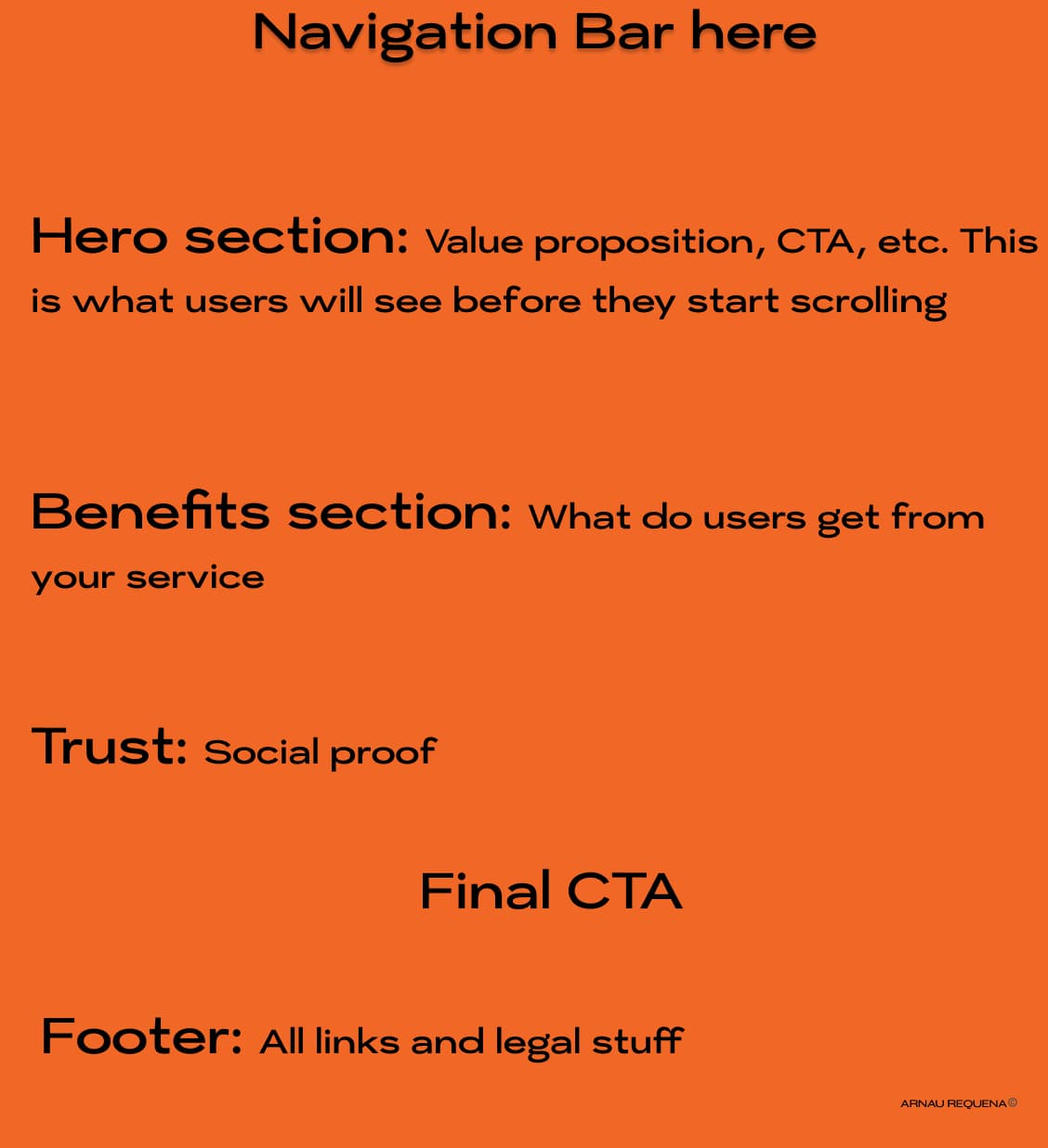
Now it is time to start brainstorming. Use Figma to look at templates (there is a lot of other people besides me that belive in sharing). Browse the templates available in v0 by Vercel, or in Framer. Once you have 2 or 1 template that you like, make a very simple schema with your website's skeleton, a.k.a. a wireframe. It should look something like this:
Write a killer prompt
Here we will use AI to make the best use of AI. Before you jump to v0, Lovable, Google Ai studio, Replit or any other AI web creator, I'd recommend you to write a very complete prompt. Since you have done all the hard work with thinking how your website should look and feel, we have to make sure that AI will actually do it as we want. And for this we have to write a very detailed prompt with the following structure (or something similar, you can experiment yourself or let me know if soemthing works better).
Here is a prety common framework for a prompt:
Create a website with (Booking system, e-commerce, contact form, etc.) used by (target audience) to (desired goal/problem you are solving). Use a clean, professional aesthetic similar to (your favorite website).
Now you can just fill in the work you have done before in between the brackets and you will have a killer prompt to start the process.
Use v0 by Vercel or any other AI web builder to generate your website
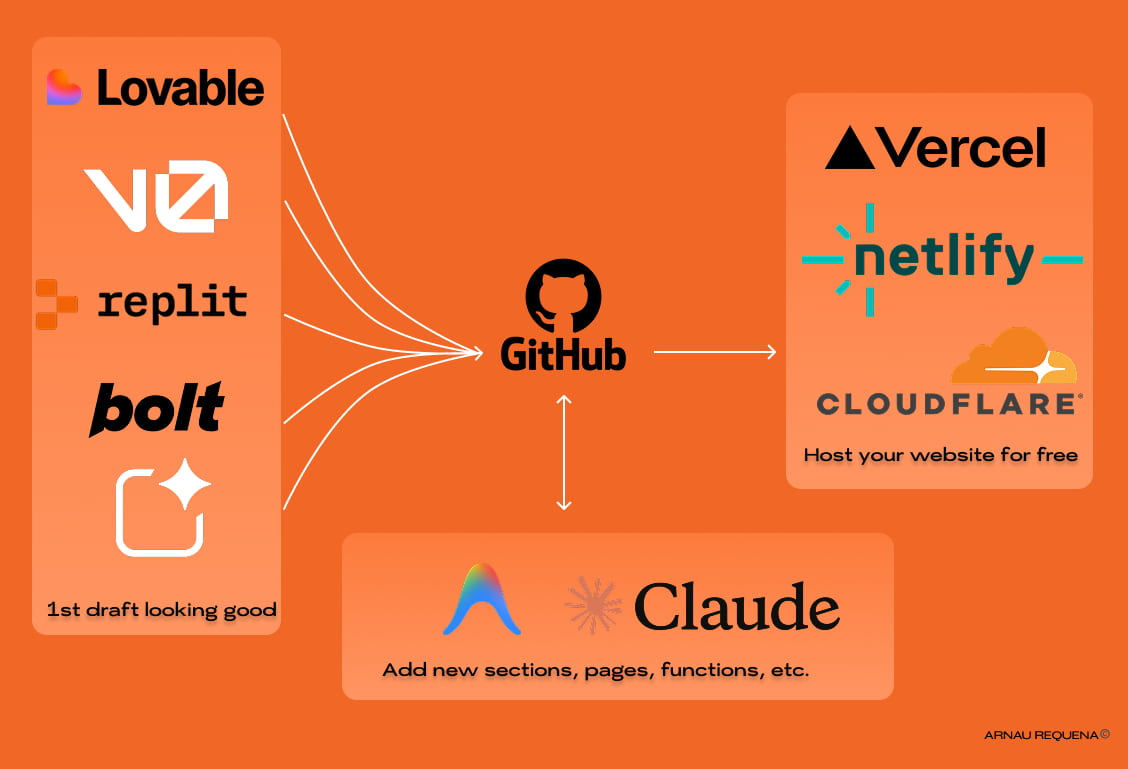
Once you have your prompt ready, you can use v0 by Vercel to generate your website. v0 is a website builder that uses AI to generate your website, such as other AI web builders like Lovable, Replit, Bolt, Figma Make, and many others. Most of them are free to use, but only for a limitied usage.
Beware of you AI credit usage.
From the first prompt, you need to be very careful what you ask the AI to do. Once it has built the first prototype, get the visuals as you want them to be, in max 2-3 prompts. After that, you can link the project to Github and we'll work from there. This is the interesting part, becasue now we will have a good working base, and we can use other tools to implement the other details and functionailities. But in order to own the code to your website, you'll need a Github account and a repository to store your code. All of this is still free, no worries.
Linking to Github and setting up deployment pipeline
If you know about github, you can skip this step. For the rest, Github is a platform that allows you to store your code in a repository. You can think of it like a "Google Drive" for your code. You can collaborate with other people, and you have a soruce of truth for your code.
So, if you don't have an account, go ahead and create one. It is free!
Once you have an account, you can create a new repository (repo). You can name it whatever you want, but it is recommended to name it after your project. You can follow this tutorrial to familiarize yourself with github: https://docs.github.com/en/get-started/quickstart/hello-world.
Once you have created the repository, you can link it to your project from v0 or the tool that you are using. If you can find a specific button to link the GitHub repository, you can just Google it and you will find very detailed tutorials. We don't need to waste time here on that.
Link your Github repo to Antigravity (Or Claude Code if you want to pay a bit for an AI tool)
Once you have linked your Github repo to your AI web creator, you can link your repo to Antigravity. Antigravity is an IDE (Integrated Development Environment). Basically it's a tool where you can organize all your files from your repository and you can easily edit them. On top of that it has an amazingly good AI editor tool that can help you implement new functionalities to the website. You can ask questions about the code, ask it to fix any bugs, etc. And the best part of it, is that by the time of writing this article, the Anti-Gravity AI tool is for free. I have personally only hit once the limit but I pushed it a lot so for any first website project, you should be completely fine by using the Antigravity AI tool.
Deploy your website
Now, where does the site live? Since you own the code, you have choices:
- Vercel: The fastest setup for v0 users.
- Netlify: Great for beginners who want easy forms.
- Cloudflare Pages: The best for pure speed and a "set it and forget it" free tier.
Connect your GitHub repo to any of these, and every time you update your code with AI and you commit your changes to github, your live website updates automatically.
Perfecting your website
I hope I have given you a starting point and given you the motivation to start this project! Wether you are a small business owner, an artist or someone wanting to build a website for a volunteering cause, having a website is the best way to reach your audience.
In case you run into any issues or you want support when setting the strategy, don't know what type of content to add or need help setting a specific feature, don't hesitate to contact me. I'll be happy to help you!

Stay Updated
Subscribe to get notified about new articles, ways to leverage AI tools and learn from my mistakes.
More Articles
How We Cut Our CAC by 70%: The Experiments, the Creatives, and the AI Tools That Actually Helped
How I reduced CAC by over 70% with almost no budget. The exact experiments I ran, how I used AI tools like Manus for research, and why the experimentation mindset matters more than any tool.
How I ship features without a dev team
The exact workflow I use to go from idea to deployed feature as a non-technical founder: Linear, Claude Code, AMP, and a CI/CD pipeline that keeps it safe.
Is Your Wix Site Slow? Here's Why (And How to Fix It)
Wix sites average 4-6 second load times. Here's why + how to get to <1.5 seconds. Real before/after: 6.5s → 1.1s (83% faster). Performance optimization guide.